Planned / 55 seconds
The calculator experience
Two steps, an ungated educational result, and optional next actions. This cut stops before identity entry or submission.
Inspect the current calculator preview →Generis Organization / Case study
Life insurance agency we operateFor the life insurance agency we operate, we built an educational calculator connected to optional CRM intake, tracking, follow-up, and a separate appointment-booking process.
Want to inspect the visitor experience? Open the public calculator ↗
Planning a project for your business or agency? Discuss a scoped implementation →

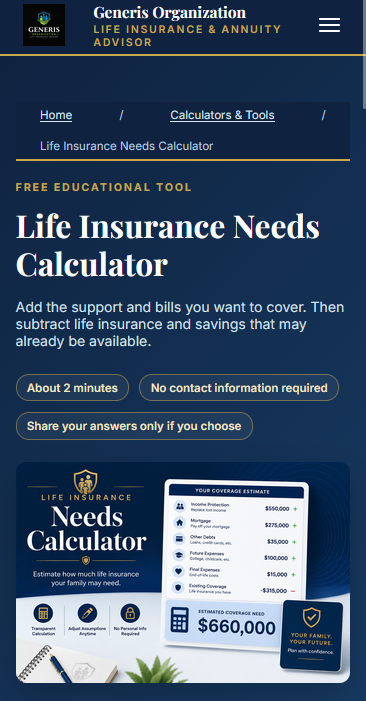
That gives us direct, firsthand responsibility for how its public website, educational tools, inquiry paths, CRM workflows, analytics, advertising measurement, and reporting systems work together.
Complete system demonstration
Watch a visitor use the calculator, optionally request a review, enter the CRM workflow, and choose a separate appointment-booking path.
Planned / 55 seconds
Two steps, an ungated educational result, and optional next actions. This cut stops before identity entry or submission.
Inspect the current calculator preview →The walkthrough follows the customer-facing path and the handoffs that help a team respond with useful context.
Open the MP4 directly ↗ Review the implementation steps and screenshots →
Planned / agency technical cut
A shorter view of event contracts, consent boundaries, validated requests, contact matching, retry behavior, and the handoff into reporting.
Inspect the reporting example →The business challenge
The calculator provides an answer before contact. CRM intake begins only with an optional review request, and appointment booking remains a separate visitor action.
01 / Help visitors take the first step
The calculator is public, ungated, and based on assumptions the visitor controls. It provides an immediate result, editable inputs, a transparent breakdown, and optional next steps without requiring contact information.
Live calculator
Many visitors need to understand the problem before they are ready to contact a business.
A visitor can revise the inputs, inspect the calculation, and choose whether to request a review. Contact details are requested only for that optional next step.
Visitors can work through the assumptions before requesting a review, so a later conversation can begin with the estimate and context they chose to share.
The result is an educational estimate—not a quote, price, approval, or policy recommendation. It does not claim a sales or conversion result.
Fictional demonstration values
The calculation is one example of how a useful interactive tool can answer a prospect’s question and provide a natural next step. These round-number inputs contain no customer information.
Illustrative estimated additional coverage to consider. This is not a customer result, financial recommendation, quote, price, approval, revenue figure, or conversion metric.
($70,000 × 8) + $210,000 + $12,000 + $30,000 + $15,000 − $100,000 − $25,000 = $702,000
Behind the visitor experience
A review request needs a destination, an organized record, and a defined next step. These implementations connect intake, measurement, and reporting while keeping their different roles clear.
An optional review request creates or updates a GoHighLevel contact with shared calculator context and source tags. Calculator completion alone creates neither a contact nor an opportunity.
Commercial relevance: Contact context, tags, and a defined follow-up path can reduce manual coordination and give the next person a clearer starting point.
Steps 4–7: distinguish contact, context, tags, and communication →Named GTM/GA4 events separate calculator start, completion, and optional review submission. Separate advertising actions cover selected lead and operational milestones.
Commercial relevance: Separating interactions and lead stages can help a business investigate friction and evaluate which marketing questions need attention.
Step 2: distinguish a measured interaction from an inquiry →For an advertising setup, learn how to test Google Ads conversion tracking and check which actions Google Ads actually recorded.
The custom Marketing OS brings page and search evidence, reporting periods, trends, comparisons, and coverage status together for prioritization—not causal performance proof.
Commercial relevance: A shared view of page trends, search context, and evidence coverage can reduce the manual work of reconciling reports before choosing an investigation.
Step 8: distinguish reporting from business outcomes →Technical implementation / eight distinct steps
Follow the handoffs between the browser, analytics, request handler, and GoHighLevel. November 4, 2026 controlled testing demonstrated calculator events, optional contact intake, shared notes, source tags, communication actions, and separate booking. These implementation patterns can be scoped for other client projects.
Use the screenshots for interface and configuration detail, and the completed walkthrough for recorded execution. The GTM screenshot captures a service-form event; calculator-specific GTM/GA4 checks were completed on November 4. Watch the recorded handoffs → If you are diagnosing a similar handoff, use the form-to-follow-up troubleshooting guide →
The browser calculates an educational estimate from visitor-entered assumptions, applies a zero floor, and shows an itemized breakdown. Visitors can revise or print it without sending contact information.
Evidence: public calculator, formula and interaction tests. Completion alone creates no GHL contact.
Calculator interface →Start and completion events fired in GTM and appeared in GA4 DebugView. Review-submit appeared in DebugView after the optional inquiry. These events separate calculator use from a request for contact.
Evidence: November 4 controlled event checks. Financial calculator answers stay out of analytics.
Form-event verification and its limits →An optional review request starts the contact process. Contact permission is required; answer sharing remains a separate opt-in, so a visitor can request help without sharing the calculator figures.
Evidence: controlled review submission and separate contact-permission/answer-sharing validation.
Optional inquiry interface →The request handler checks permitted fields, consent, calculator totals, and the submission ID before creating or matching the contact. Stored processing state supports controlled retries, rather than treating every retry as a new inquiry.
Evidence: repeat/conflicting-ID and failure tests; November 4 controlled contact creation/update.
CRM configuration and contact boundaries →When answer sharing is selected, the handler adds the submitted calculator context to a structured contact note. The team can review the stated assumptions and question before following up, without treating the figures as verified financial information.
Evidence: calculator context recorded in the November 4 controlled test contact note.
Shared context and workflow boundaries →Calculator/source tags were demonstrated in the contact record. The additional attribution fields inspected in the test were empty. The calculator integration does not create a GHL opportunity.
Evidence: November 4 tag demonstration and inspected field state.
Source tags and opportunity boundaries →Customer and owner email/SMS actions were tested and reported as sent. After the review request, the visitor can choose to open the calendar and book an appointment. The video shows that separate booking and its confirmation.
Evidence: November 4 controlled actions and recording. Sent status does not prove universal delivery or customer response.
Tested follow-up and separate booking →Generis Organization’s custom Marketing OS brings website and search evidence together with reporting periods, trends, and comparisons. The team can choose what to investigate next and review where the available evidence is incomplete.
Evidence: Generis Organization reporting implementation and approved interface screenshot.
Generis Organization reporting screenshot →Controlled testing demonstrates the handoffs shown here. It does not establish customer acquisition, revenue gains, conversion-rate improvement, universal message delivery, or every consent branch. Other projects need their own scope and testing.
How Generis Marketing can help
Tell us where customers, inquiries, or information get lost. We’ll help define a practical website, CRM, automation, measurement, or reporting project—and how to test it.