
Lead follow-up automation

Make it easier to follow up with new leads while they’re still interested.

A customer asks for a quote, leaves a message, or fills out your form. What happens next? We can help get that request to the right person, keep the details together, and make follow-up easier—without someone checking every inbox all day.

We work with the tools you already use where possible. Your team still handles real customer conversations.

You shouldn’t need to check five places for one new customer.

Whether requests come through forms, calls, or bookings, we look for the place where people get missed or staff waste time. Then we fix that part first.

Historical research · March 2011Nearly 7×

the likelihood of qualifying a web-generated lead when contact was attempted within one hour rather than after waiting longer than an hour.

Research context

When someone asks for help, waiting can cost you the conversation.

A 2011 Harvard Business Review analysis of approximately 1.25 million leads found a strong link between faster contact attempts and reaching a decision maker. The research measured lead qualification—not completed sales.

We can help your team see new inquiries sooner and know who should respond. An automated message can acknowledge a request, but a real person still needs to have the conversation.

This is historical research, not a promise that faster follow-up will produce a particular number of customers or sales.

Read “The Short Life of Online Sales Leads,” Harvard Business Review (2011) ↗
What changes for your business

Less chasing messages. More time for customers.

When a customer asks for something, your team should know who needs to reply, what the customer asked, and whether anyone has followed up.

01 / Route

Know about new inquiries sooner.

Instead of checking a crowded inbox, send an alert to the person responsible for the new request.

02 / Organize

Keep the customer’s details in one place.

Keep the question, contact details, and notes together so nobody has to search through emails to understand the request.

03 / Follow up

Stop relying on someone remembering to follow up.

Set up appropriate reminders and team tasks for inquiries that still need attention. Messages only go out where permission allows.

04 / Improve

See which inquiries still need a response.

Give your team a clearer view of what’s been handled and what’s waiting, instead of guessing.

Here's what this could look like

A customer asks for a quote while you're busy on another job.

The customer may be contacting several businesses. A good follow-up process helps your team notice the request and take the next step while the customer is still interested.

Without a clear process

The request sits in an inbox.

Someone means to reply later. Another person assumes it's handled. Meanwhile, the customer keeps looking.

With a follow-up system

The right person sees it.

The request goes into the CRM with useful details. A team member gets an alert, and an open task shows that a reply is needed.

Why it's worth fixing

Less chasing. A better chance to respond in time.

Your team spends less time sorting messages and has a clearer opportunity to speak with an interested customer.

Illustrative example of a possible workflow, not a measured client result. Actual steps depend on your software and communication permissions.

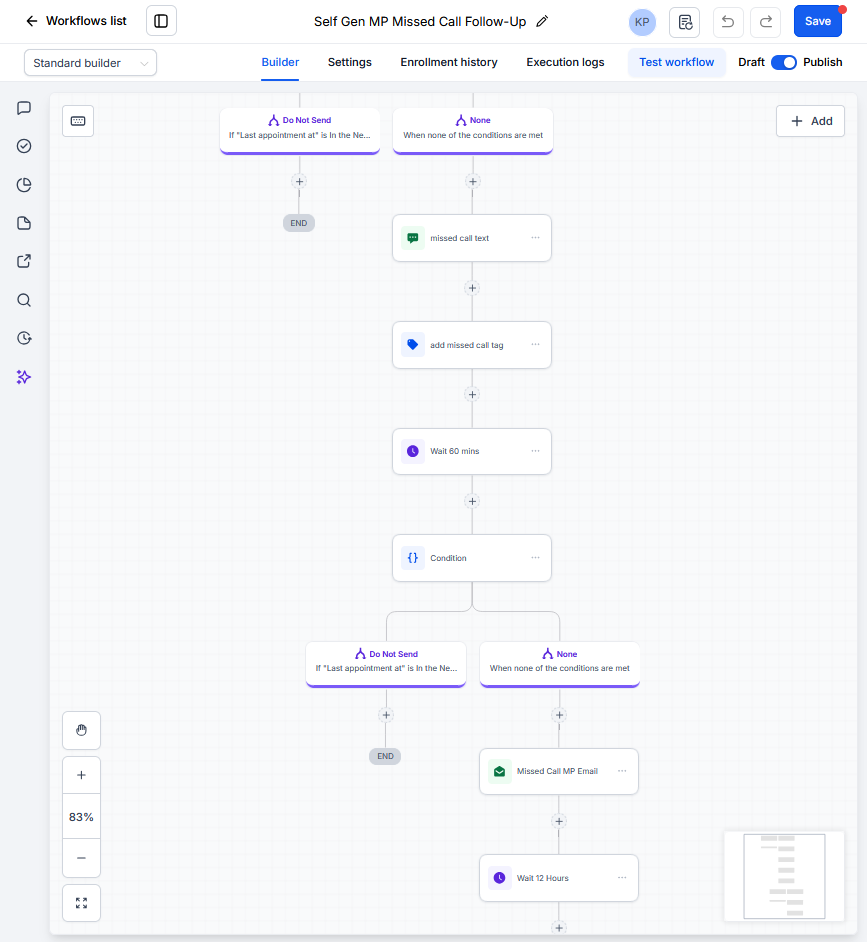
GoHighLevel missed-call workflow with text, tag, wait, condition, email, and stop branches
Approved Generis Organization configuration screenshot · Separate conditional missed-call follow-up workflow

From our own business

Here’s what we’ve built—not just what we talk about.

At Generis Organization, the life insurance agency we operate, we configured a missed-call follow-up workflow. In a separate test, we confirmed that a customer’s optional review request could reach our CRM with the details they chose to share. The screenshot and case study show these two different examples.

  • Missed-call workflow: the screenshot shows how different conditions can lead to different follow-up steps. It shows the setup, not proof that every message was delivered.
  • Tested inquiry: an optional request created or found a CRM contact and saved the information the visitor agreed to share.
  • Customer choice: using the calculator, asking for a review, sharing answers, and booking were separate decisions.

What this proves: we can show the configuration and the specific steps tested. We have not established how often messages reach customers or how much extra revenue the systems produce.

See the real example and walkthrough →

How we help

We find the step that’s costing you time—and fix it.

You don’t need to rebuild your whole business. We start with what happens when someone reaches out and improve the part that causes delays or extra work.

STEP / 01

Find where requests get stuck.

Look at forms, missed calls, bookings, and what your team does when a request arrives.

STEP / 02

Make it clear who follows up.

Decide who should see each request, what information they need, and what happens next.

STEP / 03

Set up the helpful reminders and alerts.

Connect supported tools and test both normal requests and the situations where something goes wrong.

STEP / 04

Show your team how it works.

Explain the new process and what to check so requests don’t get overlooked.

When it makes sense

A useful fix for a busy business—not more busywork.

You may not need a new CRM or more staff. You may just need a more reliable way to handle the inquiries you already receive.

This may help if…

  • quote requests sit in a shared inbox;
  • missed calls don’t have an obvious next step;
  • two people assume the other one will reply;
  • you can’t easily tell which requests still need attention.

What automation won’t do

  • replace the judgment or service of a real person;
  • turn every inquiry into a customer;
  • make unwanted or unpermitted messages acceptable;
  • tell you what happened if the necessary data was never recorded.

See for yourself

Want to see what this looks like?

We’ve recorded a working website-to-CRM example. You can watch it, browse our other projects, or see how we price a focused improvement.

Common questions

Questions you may be asking

Do I have to change the software my team uses?

Not necessarily. We start with what you use today. The fix might be better notifications, clearer ownership, or a connection between tools—not a whole new system.

Will this automatically answer every customer?

No. The goal is to make it easier for your team to respond, not to pretend a bot can handle every conversation. We’ll agree on the reminders and messages that make sense, including the required permissions.

Can this send texts or emails for me?

Sometimes, where the customer has given the appropriate permission and the channel allows it. A person submitting a form is not automatically permission for every kind of marketing message.

Will this guarantee more sales?

No. The goal is to help your team notice and handle more of the inquiries you already receive. Faster, better-organized follow-up can give a customer a better chance of reaching the right person, but we cannot promise how many will buy.

Start with the problem

What happens after someone contacts your business?

If requests get buried, passed between people, or followed up too late, tell us what’s happening. We’ll help you identify a practical first fix.