See which pages prompt action.
Review where visitors start forms, select booking options, call, or take another defined step.
Analytics & conversion tracking
We set up and test tracking for important website actions so you can see which pages prompt forms or bookings, where people leave a process unfinished, and whether the actions you rely on are being recorded correctly. That gives you better evidence for deciding what to improve and where marketing spending deserves a closer look.
Tracking can verify a defined website action. Actual inquiries and later customer outcomes require the corresponding form, CRM, sales, or commerce evidence.
Start with a business question: Which page leads to inquiries? Where do people abandon a form? Is the booking action recorded? Then define and test the tracking needed to answer it.
What better measurement supports
Clear definitions help you investigate what people do on the website and compare it with actual inquiry or sales records when those systems can be connected.
Review where visitors start forms, select booking options, call, or take another defined step.
Distinguish a form start from a validated submission so a drop-off can be investigated instead of hidden in one total.
Use preview and debug tools to verify selected events before relying on them in reports or advertising platforms.
Combine website signals with available business context to decide which page, process, or marketing question deserves attention.
Illustrative tracking example
Tracking should narrow the question your team needs to investigate—not declare a cause the data cannot prove.
Page traffic alone makes the quote page look active. Separate form-start and validated-submission events reveal a large gap between beginning the request and completing it.
The gap points to a focused investigation: mobile usability, unclear questions, errors, form length, or another obstacle. After a change, the same tested stages can be compared again.
This is an illustrative scenario, not observed performance data. The event gap would identify an improvement opportunity, but it would not by itself prove why visitors stopped or guarantee that a change would increase inquiries.
A direct answer
It records defined actions. The meaning depends on the trigger and the evidence available after that action.
Useful for traffic context, but not proof of interest or identity.
A click, form start, calculator step, or similar defined event.
A validated form, call, or booking may be a lead when the implementation supports that definition.
Qualification, sale, revenue, or retention usually requires CRM, sales, or commerce evidence beyond analytics.
The stages can be connected where suitable data and permissions exist, but one recorded interaction should not be relabeled as a later outcome.
Approved technical evidence
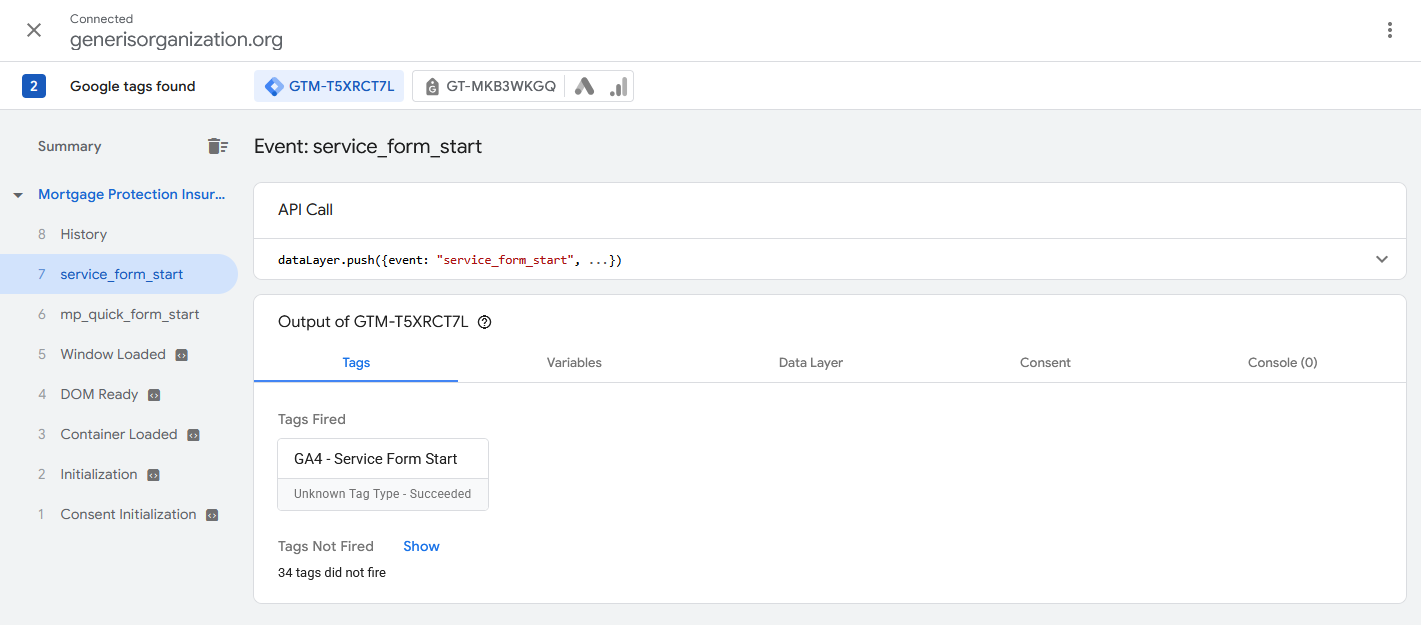
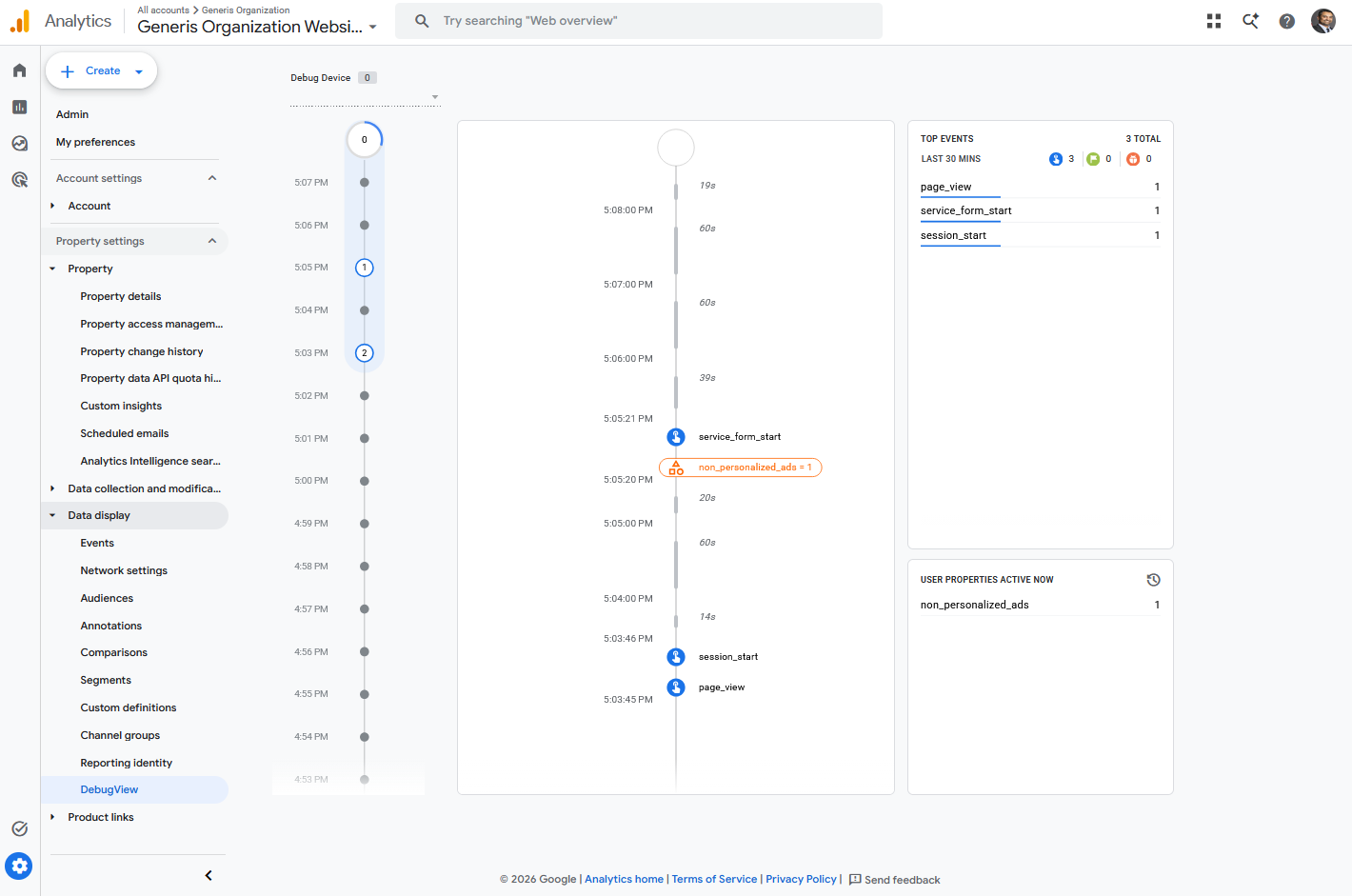
These screenshots show a named service_form_start test event in Google Tag Manager preview and the corresponding event in GA4 DebugView for Generis Organization.
Evidence boundary: this verifies selected technical behavior during testing. It is not aggregate visitor data and does not establish a conversion-rate, sales, revenue, or ROI result.
What can be included
The project can focus on a new setup, a specific broken path, or a review of the events your team currently treats as important.
Review or configure relevant streams, events, parameters, key events, and linked products within the approved scope.
Organize supported tracking logic and use explicit data-layer events where the website implementation calls for them.
Distinguish observable interaction stages and select the ones that merit measurement.
Test agreed scenarios, record limitations, and leave the setup easier for the next person to understand.
Reporting context
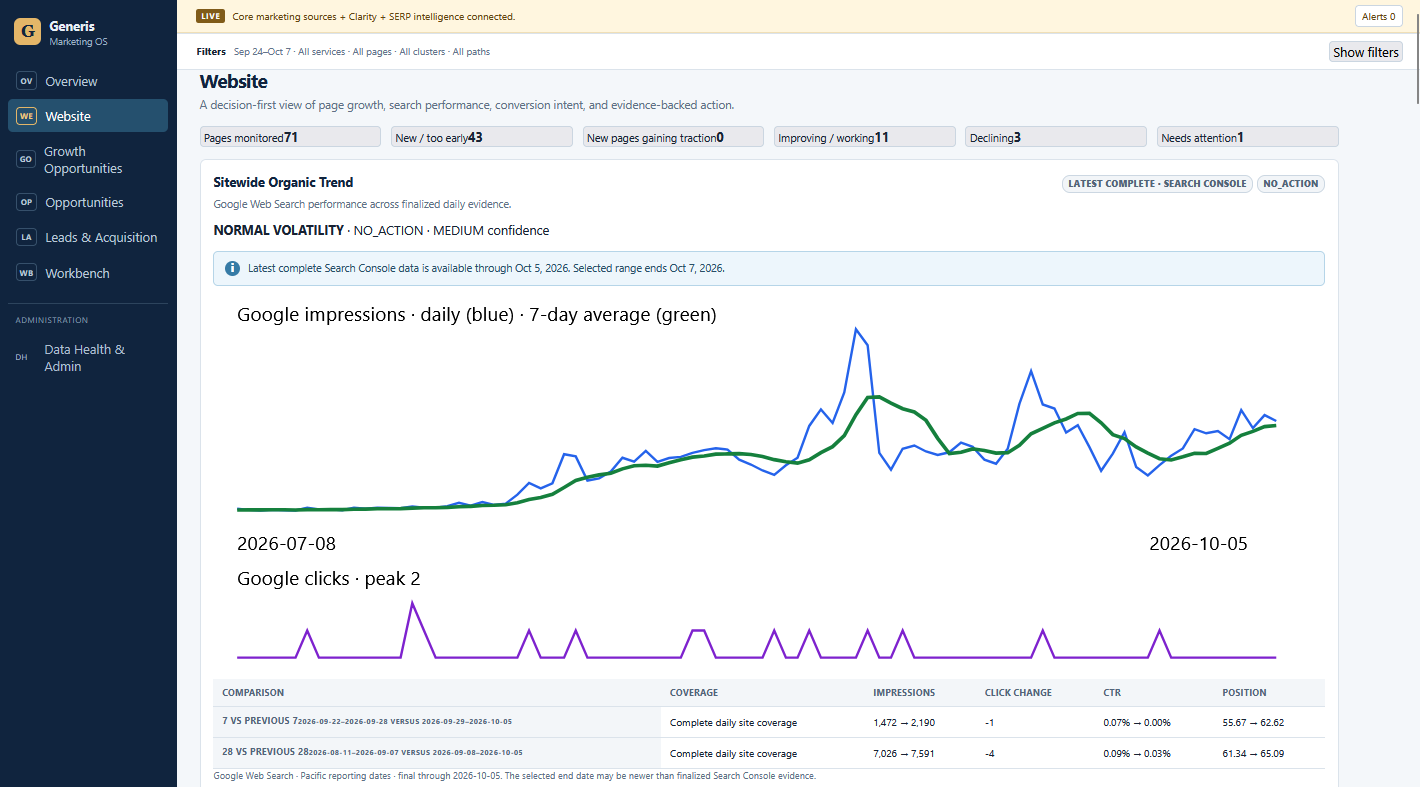
For Generis Organization, we built an internal reporting interface that brings available website and search evidence together with periods, comparisons, and coverage labels.
The interface can support investigation and prioritization. It does not prove that a website change caused a search, lead, revenue, or profitability outcome.
See the reporting example →Connected services
Tracking can describe a website or system event. The related service pages address the experience and data handoff that create that event.
Common questions
An event records a defined interaction. GA4 can mark an important event as a key event. A sale or other business outcome needs suitable commerce, CRM, or sales evidence; it should not be inferred from an earlier website action.
Often, when the website, form, calendar, consent setup, and platform expose a suitable event or confirmation state. We confirm the trigger and test method before promising a specific implementation.
No. Analytics can support attribution and journey analysis, but consent, device changes, offline conversations, platform rules, and incomplete CRM data create limits. Causal and profitability claims require more evidence.
No. The appropriate consent and privacy approach depends on the data, technologies, audiences, and jurisdictions involved. The implementation scope must respect those requirements and the site’s approved policies.
Start with the decision
Tell us which page, form, booking action, or marketing question you need to understand. We’ll help define the events, tests, and business evidence needed for a useful measurement project.